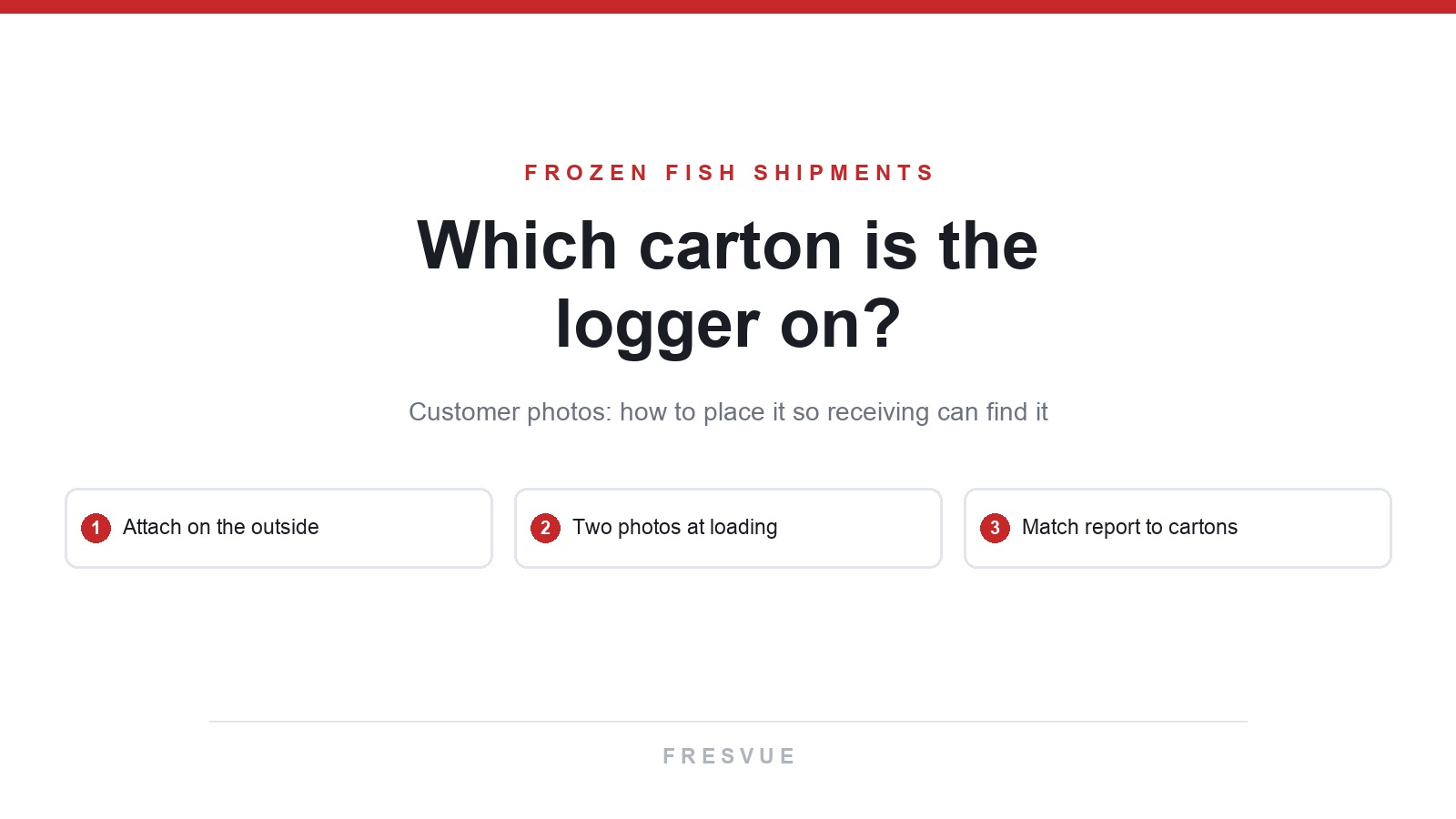
You open the container doors and see rows of frozen fish cartons that all look alike. You want to check the temperature during transit, but first you have to find the logger. Which carton is it on?
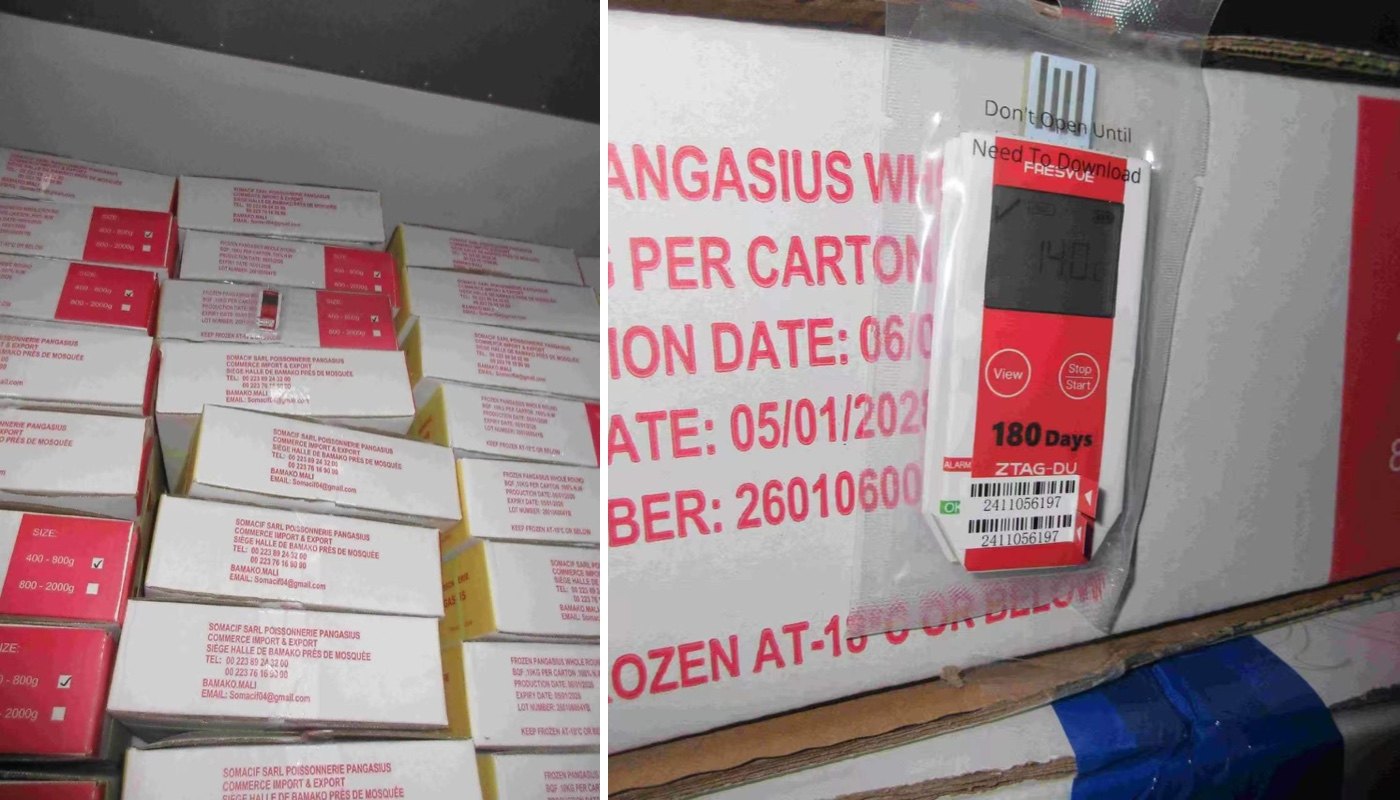
Figure 1. Customer photos showing the loaded container on the left and a close-up of the logger on the right.
Where should you put the logger so the receiving team can find it?
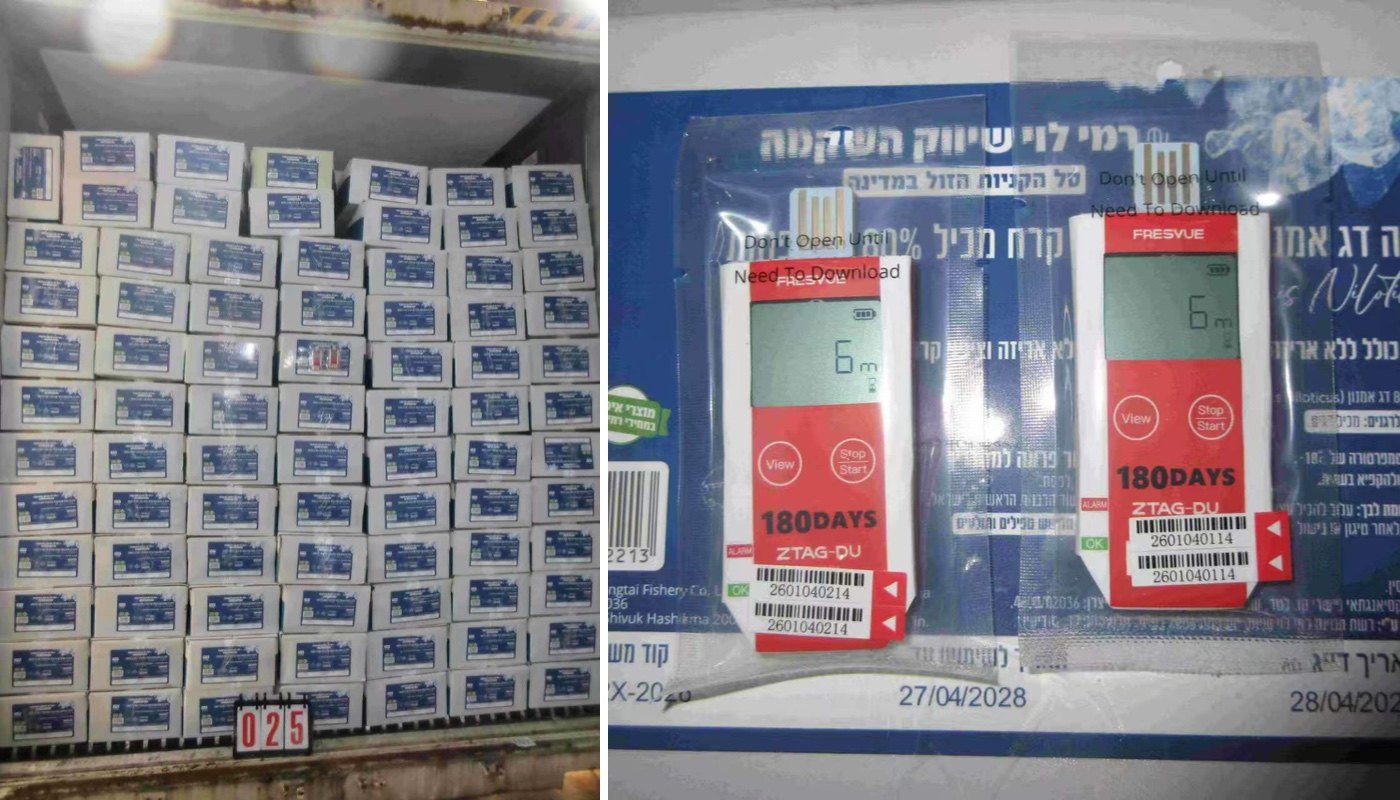
In these customer photos of frozen tilapia fillets and pangasius shipments, the logger is attached to the outside of a carton. Some shipments also have a temperature monitoring card next to the logger. It lists the purchase order number, container number, dispatch date, and temperature requirement. When the receiving team finds the logger, they can check which shipment it belongs to.
Figure 2. A logger and temperature monitoring card on the outside of a frozen tilapia fillet carton.
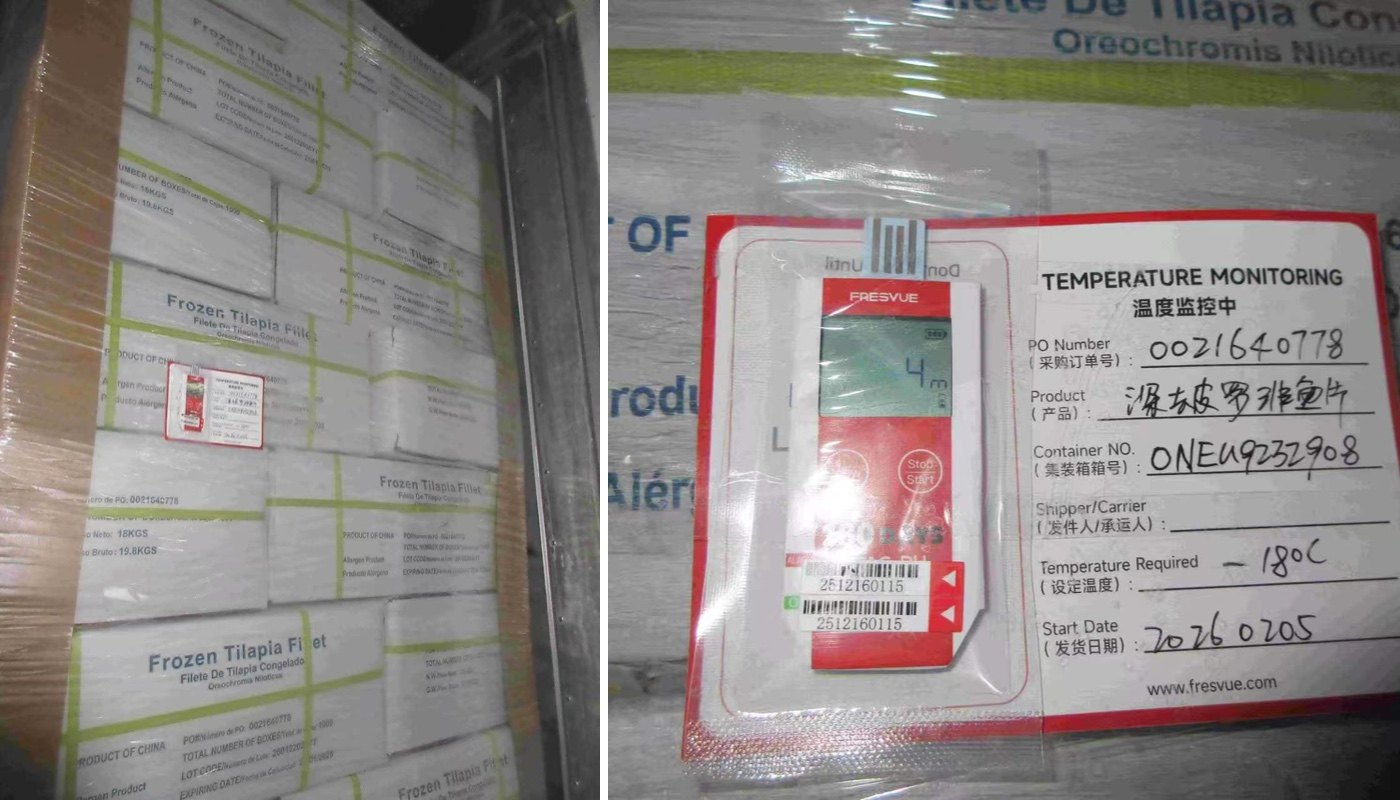
Take two photos during loading. Get one close-up so the receiving team can see which side of the carton the logger is on. Then step back and take a wider shot that shows the surrounding rows. Send both photos along with the logger ID and carton location so the team knows where to look while unloading.
Figure 3. Customer photos showing how the logger is attached to the outside of a carton.
The temperature went up. What should you check first?
Remove the FRESVUE ZTAG-DU Single-Use USB Temperature Data Logger and plug it into a computer to read the report. Check when the temperature started to rise, whether it went above the agreed limit, and how long it stayed above that limit. Then compare those times with transfer, door-opening, and unloading records.
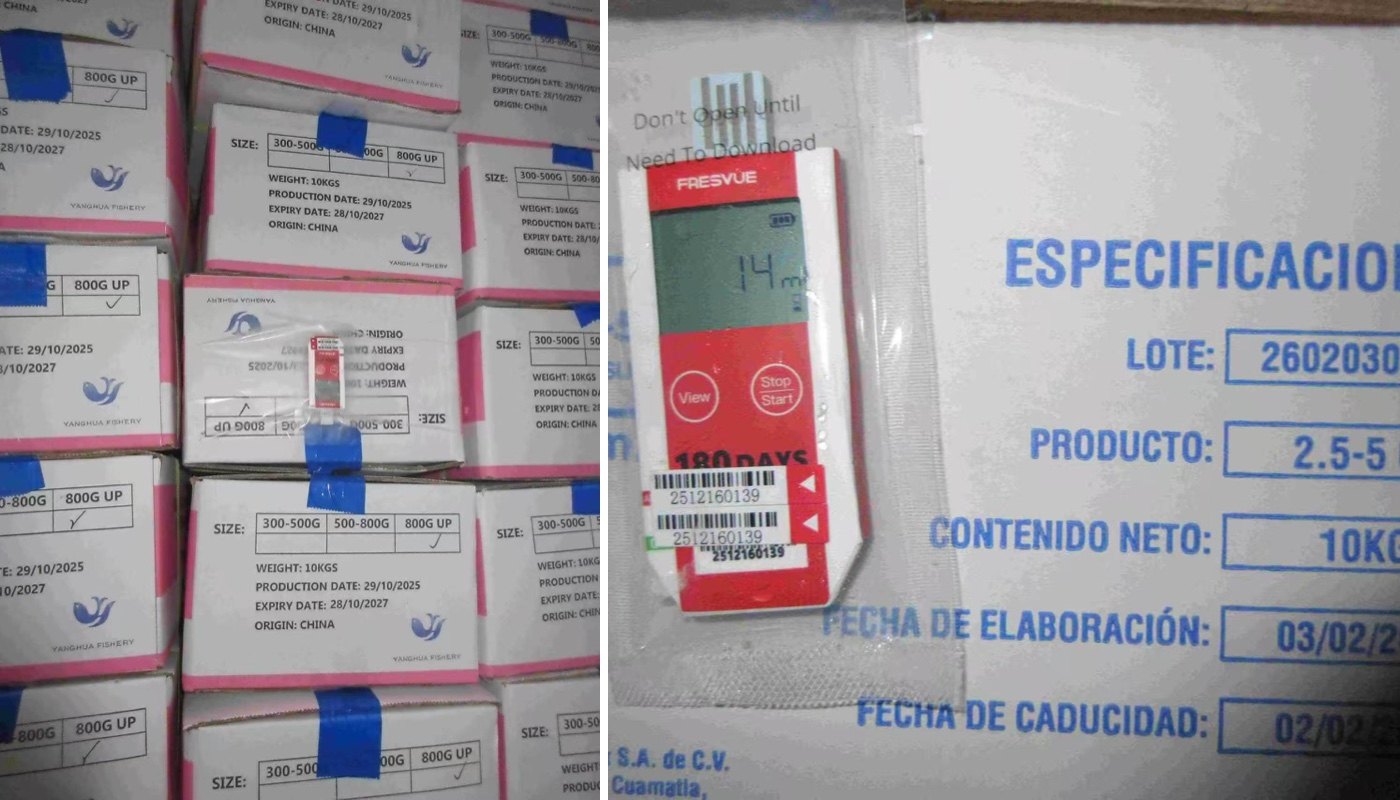
The logger records the temperature where it was placed. If it was attached to a carton near the container doors, start by checking the cartons in that area. Then measure the product temperature according to your receiving procedure. The loading photos help you match the report to the right part of the load.
Figure 4. Frozen pangasius cartons in the container and a close-up of the ZTAG-DU attached to a carton.
Why frozen fish leaves no room for a temperature gap
Frozen fish is unforgiving about temperature because the damage is invisible until it is too late. A carton of tilapia fillets or pangasius can look perfectly frozen at receiving while its core temperature drifted above the agreed limit for hours during transit. By the time the texture softens or the smell changes, the shipment is already a claim, not a save. The standard holding temperature for frozen fish is -18°C or colder, and for sashimi-grade tuna it is -60°C. Every degree above the limit shortens shelf life, and every freeze-thaw cycle damages texture: ice crystals grow, drip loss increases, and the fish that reaches the customer is drier and softer than the fish that left the plant. For scombroid species such as tuna and mackerel, temperature abuse also carries a food-safety risk, because histamine can build up while the fish is warm and no amount of re-freezing removes it. That is why a temperature record matters more for frozen fish than for most other frozen foods. The buyer is not just checking a number on a chart. They are checking whether the cold chain held from the loading dock to their door — and whether they can prove it if the customer asks.
Which logger fits a frozen fish shipment?
Not every frozen fish shipment needs the same logger. Use this table to pick by lane.
| Logger | Best for | Temperature range | Display | How you get the data |
|---|
| ZTAG-DU | Everyday frozen fish export, receiving teams that want a reading on the spot | -30°C to 70°C | LCD on the device | Plug into any computer, PDF/CSV report generates automatically. |
| ZTAG-T | Cost-sensitive high-volume shipments | -30°C to 70°C | LED indicator | Plug into any computer, PDF/CSV report generates automatically. |
| ZTAG-90T | Tuna and other ultra-low shipments, dry-ice packing | -90°C to 70°C | LED indicator | Plug into any computer, encrypted PDF report. |
| ZTAG-20GTHS-LI | High-value lanes where you need an alert while the shipment is still moving | -20°C to 70°C | LCD on the device | Live to the cloud over 4G, email and app alerts, cloud PDF reports. |
The ZTAG-DU is the default choice for most frozen fish shipments: the LCD shows the current temperature and alarm status at a glance, so the receiving team can see a problem before they even plug it in, and it records for up to 180 days. The ZTAG-90T is the one to reach for when the cargo rides on dry ice or needs -60°C holding — a standard -30°C logger cannot prove a tuna shipment stayed cold enough. And when the cargo is valuable enough that a mid-voyage alert is worth more than a post-arrival report, the real-time ZTAG-20GTHS-LI streams temperature, humidity and location to the cloud while the container is still at sea. If you are still deciding between single-use and reusable for your lanes, see our guide: Single-Use vs Reusable Temperature Data Loggers.
A receiving checklist for frozen fish
Use this sequence at the dock so nothing gets missed:
- Find the logger first, using the loading photos and the carton location the shipper sent. Check the temperature monitoring card beside it and confirm the purchase order number, container number and dispatch date match.
- Read the display before unplugging anything. On the ZTAG-DU the LCD shows the current temperature and whether an alarm was triggered in transit.
- Plug the logger into a computer and read the full report. Note the highest temperature reached, how long it stayed above the agreed limit, and when the rise started.
- Match the times on the report with the shipment records: when was the container loaded, when did it change trucks, when were the doors opened, and when was it unloaded? A rise that lines up with a transfer points at the handover, not the reefer.
- Measure the product temperature in several cartons — near the doors, in the middle of the load, and at the back — following your receiving procedure. The logger records the air temperature where it was placed; the fish itself is the final check.
- Look for thaw and refreeze signs: large ice crystals, frost inside the bag, soft spots, or excess drip. Record what you find with photos.
- Decide and document: accept, quarantine for further checks, or reject — and keep the logger report with the receiving record. It is the evidence behind the decision.
Frequently asked questions
Where exactly on the carton should the logger go?
On the outside of the carton, where the receiving team can see it without opening the box, and on a carton that sits where the team unloads first. A logger buried in the middle of the load may record a different temperature from the cartons near the doors, and nobody will find it in time.
Can the logger go inside the carton instead?
It can, and some buyers prefer it, because it records the temperature closest to the fish. The trade-off is that the receiving team has to open a carton to find it, and the logger is harder to retrieve. For most export shipments, outside the carton with a monitoring card beside it is the practical choice.
The report shows a temperature rise, but the fish still feels frozen. Is the shipment OK?
Not necessarily. Fish can feel frozen while its core temperature has already risen above the limit. Trust the report and measure the product temperature in several cartons before deciding. A short rise during loading is different from hours above the limit mid-voyage — duration matters as much as the peak.
How long will the logger keep recording in a frozen container?
The ZTAG-DU is rated for up to 180 days of monitoring, and its battery is rated for up to two years at 25°C. Cold shortens battery life, so for very long lanes — 30 days or more at -25°C — confirm the expected duration with your supplier before dispatch, and use a fresh logger for each shipment.
What temperature should frozen fish stay at?
-18°C or colder for most frozen fish. Sashimi-grade tuna is held at -60°C, which needs an ultra-low logger such as the ZTAG-90T — a standard logger cannot measure that low.